

RevFind in Chrome with OffiDocs

Ad
DESCRIPTION
Quickly find your most important key points in hotel reviews
RevFind is your ultimate companion for quick and efficient hotel review exploration. Say goodbye to sifting through lengthy reviews, and say hello to streamlined decision-making. RevFind empowers you to extract the essence of hotel experiences by searching for specific keywords within reviews. Whether you're looking for mentions of "ocean view," "comfortable beds," or "friendly staff," RevFind allows you to uncover key points that matter most to you, using Booking's amazing review system.
➼ How to use:
• Find a Hotel that you want to check out Booking.com
• Make sure that the language is set to 'English'
• Click on 'Read all Reviews'
• Open RevFind and let it run its magic
• If the hotel has too many review pages, you can click on the Stop button after loading a relevant amount of pages, to stop the script from loading any new reviews
• RevFind will provide a few Key Points extracted from the reviews
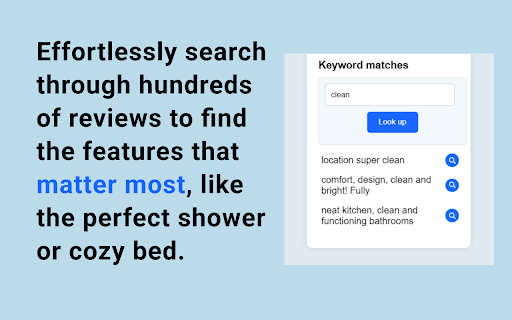
• Use the 'Keyword matches' section to input any desired keyword (example: shower) and hit 'Look up'
• Enjoy the list of all matches of your keyword in the reviews with a short context
• For further information click the magnifying glass next to each short text to open up the full original review.
➼ Bugs and Issues
Please report all bugs and issues to This email address is being protected from spambots. You need JavaScript enabled to view it. and we will fix them immediately.
If you enjoy using RevFind, we'd greatly appreciate your support by leaving a 5-star rating here!


