Starting the year with lighter, optimized files makes everything easier — faster uploads, smoother sharing, and less storage stress. If you work with videos regularly, you’ve probably faced the same issue more than once: files that are simply too large to send, upload, or store comfortably. The good news is that today you can compress video files online and even convert them into the right format directly from your browser, without installing any software or dealing with complex setups. This article walks you through a simple, practical workflow designed for everyday users who just want their videos ready to share or save — fast and hassle-free.
We’ll look at two browser-based tools that cover different needs: a quick, no-friction option for immediate results, and a more advanced alternative for users who want extra control — both with the same premise: no installation required.
Why do I need to compress video files online?
Video files are getting increasingly heavier. Higher resolutions, better cameras, and longer recordings mean larger file sizes that aren’t always practical.
Compressing video files online is especially useful when you need to:
- Share videos via email or messaging platforms
- Upload content to websites or social networks with size limits
- Free up cloud or local storage
- Prepare videos quickly without technical knowledge
- Work from different devices without installing software
Instead of downloading and configuring desktop applications, online tools let you solve the problem directly in your browser — ideal for remote work, shared computers, or quick tasks.

A Simple Browser-Based Video Workflow
The goal of this workflow is clarity and speed. No unnecessary steps, no learning curve.
The basic process looks like this:
- Upload your video
- Compress it to reduce file size
- Convert it if needed (for compatibility)
- Download the optimized file
- Save or organize it for later use
Let’s see how this works in practice using two complementary online tools.
Compress video files online fast with VideoConvertPlus
If your priority is speed and simplicity, VideoConvertPlus from RedCoolMedia is designed exactly for that.
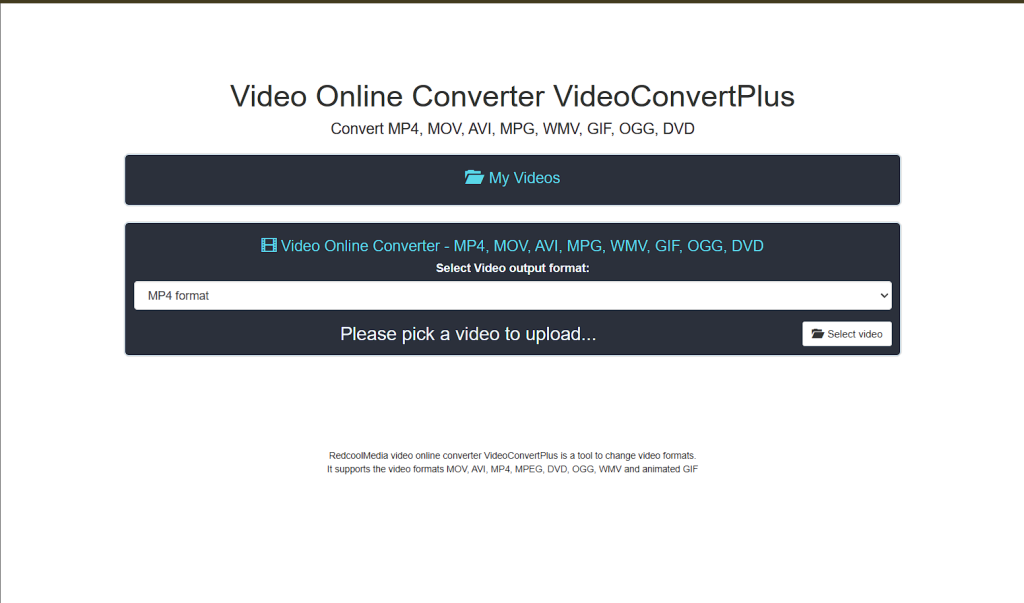
How VideoConvertPlus helps you compress video files online:
This tool is ideal when you want to:
- Compress video files online in just a few clicks
- Convert videos to common formats quickly
- Avoid technical settings or manual configurations
- Get results immediately from any browser
There’s no installation, no account required, and no steep learning curve. You upload your video, choose the output format if needed, and let the tool handle the compression automatically.
Practical Use Case in which to compress video files online
Imagine you recorded a short video on your phone and need to send it by email. The file is too large, and you don’t want to install any apps just for that.
With VideoConvertPlus, you can:
- Open the tool in your browser
- Upload the video
- Let it compress and convert the file
- Download a smaller, share-ready version
This makes it a perfect solution for everyday users, freelancers, students, or anyone who just wants things done quickly.
A More Advanced Option: HandBrake Online via RunApps
Sometimes, however, you may want more control over how your video is compressed. That’s where HandBrake Online, available through RunApps, comes in.
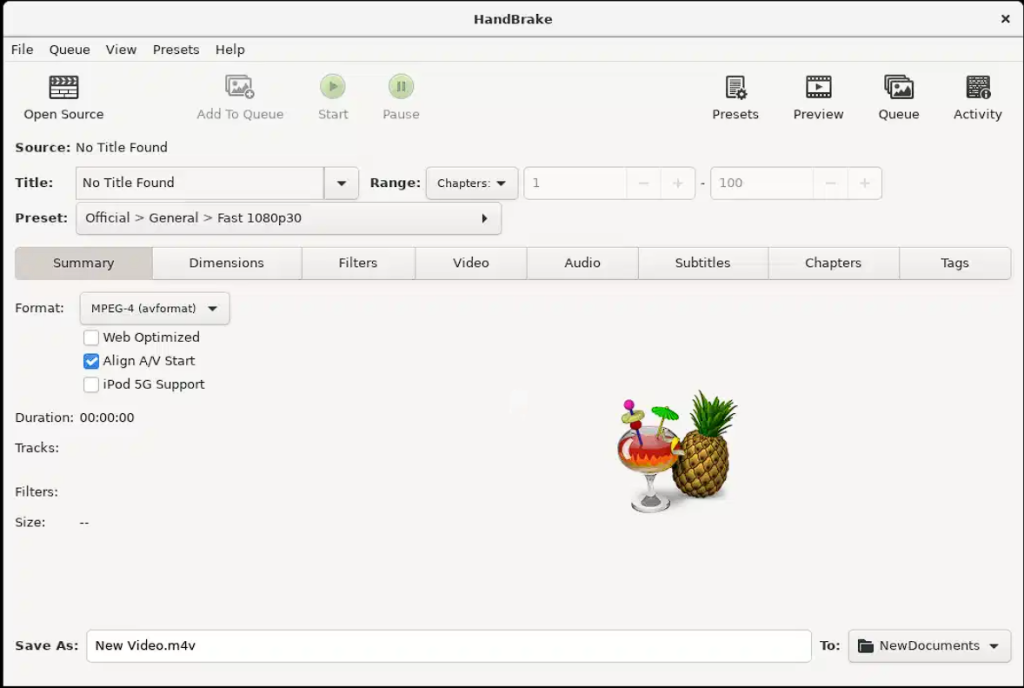
Why Choose HandBrake Online?
HandBrake is widely known as a professional-grade video compression tool. With RunApps, you can access it directly from your browser, without installing the desktop version.
This option is better suited for users who want to:
- Fine-tune compression settings
- Balance quality and file size more precisely
- Work with different codecs and resolutions
- Prepare videos for specific platforms or storage needs
Despite being more “pro-oriented,” the key advantage remains the same: everything runs online, so you don’t need to install anything locally.
When to Use This Option
HandBrake Online is ideal if you’re compressing larger files, working with higher-resolution videos, or need consistent results across multiple videos. For example, content creators or remote teams often use it to standardize video outputs before publishing or archiving.
Choosing the Right Tool for Your Needs
Both tools help you compress video files online, but they serve slightly different user profiles.
Go with VideoConvertPlus if you:
- Want the fastest possible solution
- Prefer automatic settings
- Need to compress and convert occasionally
- Value simplicity over customization
Choose HandBrake Online if you:
- Want more control over compression
- Work with larger or higher-quality videos
- Need consistent technical settings
- Don’t mind a slightly more detailed interface
The good part is that you’re not locked into one approach. You can use the quick solution when speed matters and switch to the more advanced tool when precision is needed — all within your browser.
Why Browser-Based Tools Are Ideal for Modern Workflows
Working online has become the norm, and browser-based tools fit perfectly into that reality.
Compressing video files online allows you to:
- Work from any device or operating system
- Avoid compatibility issues
- Save disk space
- Reduce setup time
- Stay productive even on shared or temporary computers
For distributed teams, freelancers, or users who simply want fewer apps installed, this approach keeps workflows clean and efficient.
Compress video files online: Preparing Your Files for Sharing or Storage
Once your video is compressed and converted, the final step is making sure it’s easy to find and reuse later.
This is where a file manager naturally fits into the flow — to store, organize, and manage your optimized videos. Having your compressed files neatly saved makes future sharing and access much easier, especially when working across different projects or devices.
Final Thoughts
Learning how to compress video files online is one of those small improvements that pays off constantly. It saves time, reduces friction, and makes everyday tasks simpler — especially at the start of a new year when organization matters most.
With tools like VideoConvertPlus for quick results and HandBrake Online via RunApps for more advanced control, you can handle video compression and conversion entirely in your browser, without installing anything.
The result? Lighter files, smoother sharing, and a reliable workflow.
To complete this browser-based workflow, platforms like OffiDocs provide an integrated environment where users can access online tools and manage their files in one place, without installing software. Combined with GoSearch, which helps users quickly find tools, documents, and resources from the browser, this ecosystem supports a smooth transition from compressing and converting video files online to storing, organizing, and accessing them whenever needed.