

Google Slides Current Slide URL Copier in Chrome with OffiDocs

Ad
DESCRIPTION
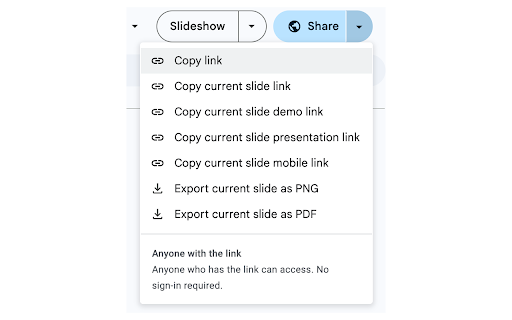
Enhanced Quick Actions menu with 6 options: copy edit/demo/presentation/mobile links and export current slide as PNG/PDF
Google Slides Current Slide URL Copier
Add 6 powerful slide sharing options directly to Google Slides' Quick Actions menu!
Seamlessly integrates with Google Slides to provide multiple ways to share and export your current slide from the native Quick Actions menu (arrow next to Share button).
*Not affiliated with Google Inc.*
Copy Links:
• Current slide edit link (collaboration)
• Current slide demo link (with toolbar)
• Current slide presentation link (full screen)
• Current slide mobile link (mobile-optimized)
Export Downloads:
• Export current slide as PNG image
• Export current slide as PDF document
How to Use:
1. Open Google Slides presentation
2. Click arrow next to "Share" button
3. Choose from 6 new options below "Copy link"
4. Done! Links copied or files downloaded instantly
Privacy:
• No data collection
• Minimal permissions (clipboard only)
• Open source: https://github.com/omriariav/slides-copy-url-current-slide
Perfect for teachers, presenters, and teams who need quick slide-specific sharing!
*Not affiliated with Google Inc.*
Google Slides Current Slide URL Copier web extension integrated with the OffiDocs Chromium online


