

Inline Base64 Tools in Chrome with OffiDocs

Ad
DESCRIPTION
Inline Base64 Tools Chrome Extension A fairly simple.
context menu based extension to encode/decode base64 strings.
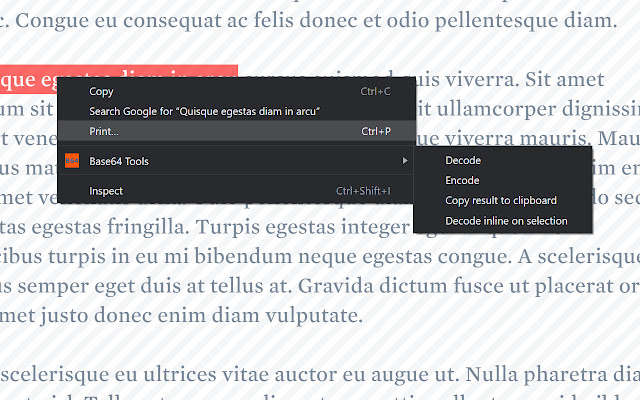
Features: - Encodes/decodes strings inline with content - no site searching required - Formats links to be clickable - Option to automatically copy encoded/decoded text to clipboard - Option to automatically attempt decode on text selection (without having to use context menu) - Recursively decodes Base64 strings which have been encoded more than once How to use: - Install extension - Select text to encode/decode - Right click -> Inline Base64 Tools -> Encode/Decode
Additional Information:
- Offered by Nelly Whads
- Average rating : 5 stars (loved it)
- Developer This email address is being protected from spambots. You need JavaScript enabled to view it.
Inline Base64 Tools web extension integrated with the OffiDocs Chromium online


