

Udemy translate speech in Chrome with OffiDocs

Ad
DESCRIPTION
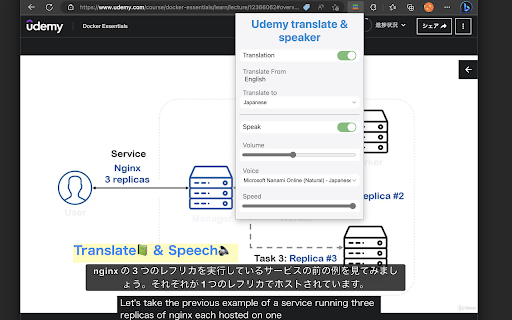
A Chrome extension that translates subtitles of Udemy content and reads them out with a synthetic voice.
## Features
- Automatic translation of Udemy video subtitles to the user's preferred language
- Caption display of translated subtitles with adjustable font size
- Playback of the translated subtitles using synthesized speech
- Customizable settings for language preferences, voice options, and playback speed
- Support for Udemy Business domains
- Double-click translation toggle functionality
- NEW: Independent subtitle display control - show/hide subtitles while keeping audio playback
- NEW: Optimized UI with single-line layout for better space efficiency
## Translation Languages
- Chinese (Simplified)
- Chinese (Traditional)
- Spanish (Spain)
- Hindi (India)
- Arabic (Saudi Arabia)
- Portuguese (Brazil)
- Portuguese (Portugal)
- Bengali (Bangladesh)
- Russian (Russia)
- Japanese (Japan)
- French (France)
- French (Canada)
- German (Germany)
- Korean (Korea)
- Vietnamese (Vietnam)
- Thai (Thailand)
- Indonesian (Indonesia)
- Filipino (Philippines)
- Italian (Italy)
- Dutch (Netherlands)
- Polish (Poland)
- Ukrainian (Ukraine)
- Turkish (Turkey)
- Swedish (Sweden)
- Norwegian (Norway)
- Danish (Denmark)
- Czech (Czech Republic)
- Hungarian (Hungary)
- Greek (Greece)
- Hebrew (Israel)
Udemy translate speech web extension integrated with the OffiDocs Chromium online


