

Web Proxy in Chrome with OffiDocs
Ad
DESCRIPTION
Use Web Proxy: Secure your browsing with a proxy per tab. Enhance privacy with our proxy web browser extension.
Web Proxy is your go-to solution for secure and private browsing. With our proxy web browser extension, you can enhance your online privacy by using a proxy per tab. This extension is designed to make proxy management simple and efficient.
⚡Get Started
1️⃣ Install the extension.
2️⃣ Click the extension icon – the sidebar will appear.
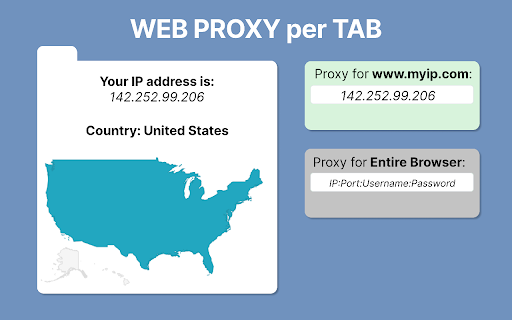
There are two sections for browser proxy configuration:
➤ First: For the current tab.
➤ Second: For the entire browser.
If you want to visit each website under a proxy, please fill in the second (Default) section.
However, sometimes you may need to visit a site under a special web proxy (for example, from a specific location). In such a case, navigate to that site, fill in the top (current tab) section, and reload the site. It will be visited from a new IP address.
You can turn the feature on or off at any time by pressing the NO PROXY checkbox. The extension icon on the top right panel always indicates whether you are under a proxy or not.
To verify that your browser is working correctly, visit a site like whatismyipaddress and toggle the proxy on and off. Your IP address should change accordingly.
⚡Proxy Server Definition
A server is a system or router that provides a gateway between users and the internet. Therefore, it helps prevent cyberattackers from entering a private network. It is a server, referred to as an intermediary because it goes between end-users and the web pages they visit online.
When a computer connects to the internet, it uses an IP address. This is similar to your home’s street address, telling incoming data where to go and marking outgoing data with a return address for other devices to authenticate.
⚡Why Should You Use the Extension?
Using a server acts as an intermediary between your computer and the internet. This allows you to hide your real location or access websites that might otherwise be blocked. For instance, you can send requests from another country and visit websites that are unavailable in your current location.
With the extension, you can simplify your browser management. All it takes is a few clicks, and you're done! Say goodbye to the tedious process of configuring the browser manually.
⚡Features and Benefits


