

ONES Link in Chrome with OffiDocs

ONES Link Chrome web store extension
Ad
DESCRIPTION
Run the Chrome online web store extension ONES Link using OffiDocs Chromium online.
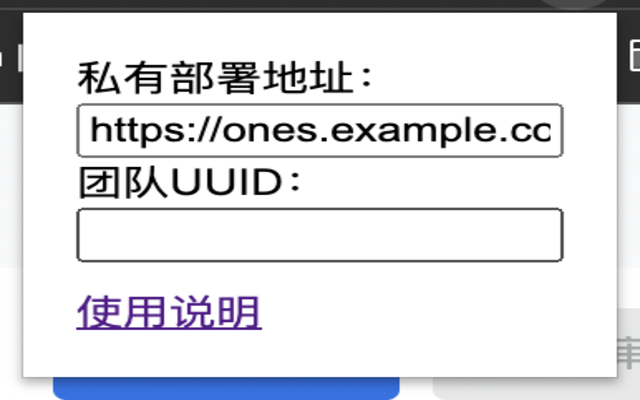
# ONES Link 为什么会做这样一个插件?主要在于 ONES 团队在从公有云迁移到私有部署后,现存所有记录中存在的链接地址仍然指向的是公有云的地址,而不是迁移后私有部署的地址,这将导致每次访问都需要手动修改一下链接地址。 ONES Link 的目标就是:当 ONES 团队从公有云迁移到私有云后,在访问 ONES 系统时帮助用户自动地从旧地址跳转到新地址上。 比如,迁移前某个 wiki 页面的地址是 https://ones.ai/wiki/#/team/a1b2c3d4/page/e5f6g7h8, 迁移后私有部署的 ONES 地址是 https://ones.
example.
com, 那么,该插件将会帮助用户自动地跳转到新地址上,即 https://ones.
example.
com/wiki/#/team/a1b2c3d4/page/e5f6g7h8, 而不用手动去更改页面地址。 ### 配置说明 - 私有部署地址 - 包含具体的协议和域名,例如:https://ones.
example.
com - 团队UUID - 当为空时则不校验具体的团队UUID - 支持指定多个团队UUID,使用逗号隔开,例如:a1b2c3d4,e5f6g7h8 ### ONES 目前的公有云地址 - https://ones.
ai - https://ones.
cn - https://ones.
com ## Author K8sCat <k8scat@gmail.
com> ## License MIT
Additional Information:
- Offered by hsowan
- Average rating : 5 stars (loved it)
- Developer This email address is being protected from spambots. You need JavaScript enabled to view it.
ONES Link web extension integrated with the OffiDocs Chromium online


