

Kokoro Speak in Chrome with OffiDocs

Ad
DESCRIPTION
In-browser Kokoro TTS Engine
Kokoro Speak: In-Browser Text-to-Speech
Kokoro Speak is a powerful text-to-speech extension that runs entirely in your browser - no internet
connection required, it converts text to natural-sounding speech with customizable voice settings.
Kokoro Speak only speaks English.
Features:
• Fully offline operation - your text never leaves your device
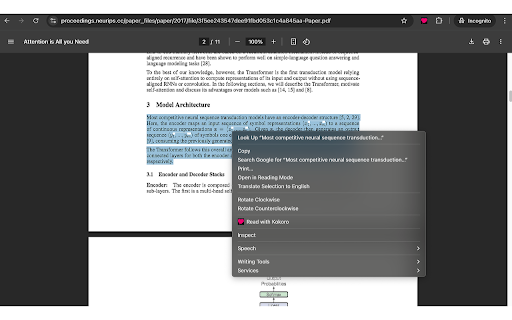
• Multiple ways to activate: keyboard shortcut (Ctrl+Shift+S), context menu, or popup
• Context menu integration allows reading any selected text within the browser
• Registers as a system TTS engine for use with Chrome's built-in accessibility features
• Adjustable voice, speed, and pitch settings
• Works on any webpage with selected text
• TTS engine powered by Kokoro 82M 1.0 model
• Use WebGPU for fast speech generation
Perfect for accessibility needs, language learning, proofreading, or simply resting your eyes while browsing.
Many thanks to hexgrad for excellent Kokoro model https://huggingface.co/hexgrad/Kokoro-82M.
Kokoro Speak web extension integrated with the OffiDocs Chromium online


