

Url Redirector in Chrome with OffiDocs

Ad
DESCRIPTION
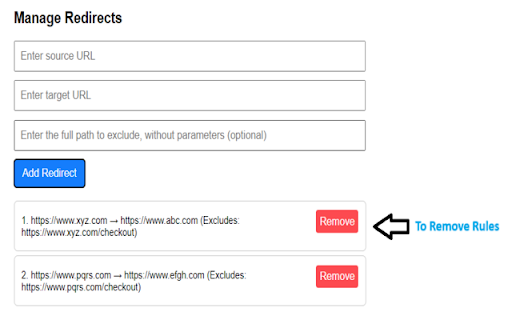
To redirect the URL from X to Y based on user provided filters. In addition, can have excluded paths
This tool is use when we need to auto redirect the url from x to y. In addition have option to allow the excluded path.
-----------------------------------------------------------------------------------------------
Example 1:
Source Url:
https://www.xyz.com?someparam=somevalue&anotherparam=anothervalue
Destination Url:
https://www.abc.com?someparam=somevalue&anotherparam=anothervalue
Exclude Path:
https://www.xyz.com/checkout?someparam=somevalue&anotherparam=anothervalue
In this case if the request url matches the exclude path that is /checkout then it won't route https://www.xyz.com/checkout to https://www.abc.com/checkout.
-------------------------------------------------------------------------------------
Note:
All the params will be automatically carry forward if params are not added over source url.
Original Url:
https://www.xyz.com?someparam=somevalue&anotherparam=anothervalue
Source Url:
https://www.xyz.com
Destination Url:
https://www.abc.com
Then route carry forward the params over destination automatically and the final url will be https://www.abc.com?someparam=somevalue&anotherparam=anothervalue
Url Redirector web extension integrated with the OffiDocs Chromium online


