

UIUCProfCritic in Chrome with OffiDocs

Ad
DESCRIPTION
Helping you save time in registering for your classes
How to use this extension:
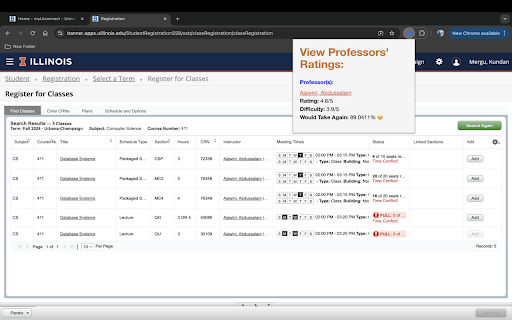
1. When you're on your registration page and selecting a section for a class, make sure the Schedule type column is properly showing **(the type could be anything other than discussion/recitation)**
2. Now click on the extension and it should work according to the description.
3. If you want more information about the professor, you can simply click on the professor's name to view their page on RateMyProfessors.com
This Chrome extension enhances the class registration experience for students at UIUC by integrating professors' ratings, difficulty levels and would take again percentages directly into the registration page(the most important numbers related to a professor that a student should know about before taking their section). The extension pulls data from RateMyProfessors.com and when the extension is activated, it scrapes the visible professors listed on the class registration page, matches them with their corresponding ratings, and displays the relevant information in an organized manner. This helps students make informed decisions when selecting courses on the spot.
UIUCProfCritic web extension integrated with the OffiDocs Chromium online


