

TR Exporter Export your Trade Republic data in Chrome with OffiDocs

Ad
DESCRIPTION
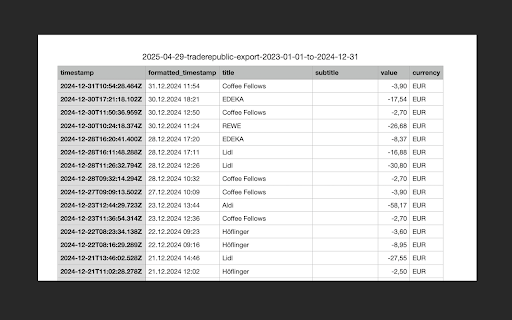
Export your Trade Republic data.
Effortlessly export your Trade Republic Transactions into csv.
Check out https://tr-exporter.com for the feature roadmap of this extension and to submit feature requests!
**CHANGELOG**
**NEW VERSION v1.0.4**:
- Data loading is now faster and more reliable (no more visible scrolling)
- Enhanced performance for large exports
- Improved UI and loading indicators
- Various minor bug fixes & stability improvements
**v1.0.3**:
- Fixed a data issue some users faced that left the csv empty
- Added option to only export transactions from a custom timespan
- Added option to format timestamp in different ways in the resulting csv
How To Use:
1. Install the extension
2. Open your Trade Republic Transactions Page
3. Click the export button, wait until all data is loaded and configure the timespan & timestamp format
4. Download your transactions and voila!
If you encounter any issues or have feedback or feature requests, please send an e-mail to This email address is being protected from spambots. You need JavaScript enabled to view it. so that we can fix the issues and incorporate any feedback.


