

Table Tennis Workout in Chrome with OffiDocs
Ad
DESCRIPTION
Catch as many falling balls as you can within the time limit!
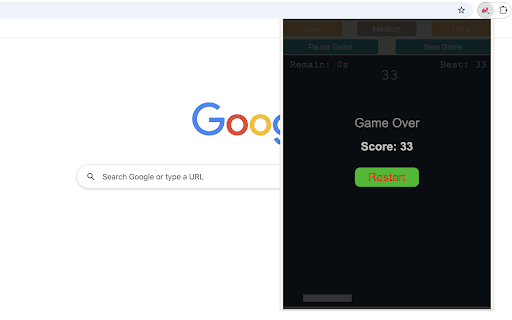
This game is designed to help you sharpen your table tennis skills. Balls will approach from various angles, and your goal is to move the paddle at the bottom of the screen to return them. Use the Left and Right arrow keys on your keyboard to control the paddle. Every successful hit awards points. After each ball, whether you hit it or miss, a new one will appear.
To get started, simply click the game icon in the Chrome extension toolbar after installation. The game will open in a popup window and run for 30 seconds, during which your score will be displayed at the end. Your highest score will be saved and shown in the top-right corner. You can also pause or start a new game during any session.
Use this extension to practice and improve your table tennis skills while having fun! Looking for a challenge? Click 'Play Next Level' below the restart button to try medium and hard difficulty modes. Plus, we've showcased our featured games after the game ends to give you even more fun!
Table Tennis Workout web extension integrated with the OffiDocs Chromium online


