

Genni AI Reply Generator in Chrome with OffiDocs

Ad
DESCRIPTION
Generate AI-powered replies using screenshots on messaging platforms.
Genni: AI-Powered Reply Generator
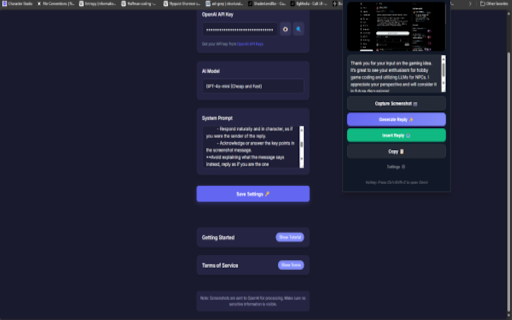
Genni is a smart assistant that generates contextually appropriate responses for your messages across various platforms using advanced AI technology.
How It Works:
Simply take a screenshot of a conversation, and Genni will analyze the content to craft a thoughtful, professional reply that you can immediately insert into your chat.
Getting Started:
Set Up Your AI Provider:
- Enter your OpenAI API Key or connect to Gemini
- Easily configure from the extension settings
- Select Your Preferred AI Model
- Customize prompt and Tempature based on your specific needs
- Personalize Your Experience (Optional)
- Tailor the AI instructions to match your communication style
- Adjust tone, length, and context sensitivity
- Default settings are optimized for professional communication
- Activate with the extension icon or keyboard shortcut (Ctrl+Shift+Q)
- Capture the conversation with a screenshot
- Review and insert the AI-generated reply.
Privacy Note:
- Screenshots are processed through your selected AI provider.
- Please ensure sensitive or confidential information is not included in your screenshots.
Genni AI Reply Generator web extension integrated with the OffiDocs Chromium online


