

Into it in Chrome with OffiDocs

Ad
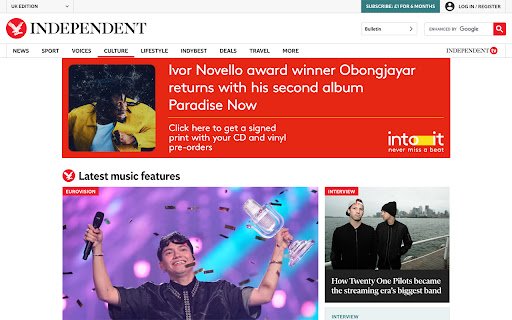
DESCRIPTION
Stay up to date with your favourite artists' latest singles, albums, merchandise and tours.
Into-it is a FREE browser extension that transforms The Guardian and The Independent websites for music fans by replacing ads with music notifications.
Whether you're into electronic, hip-hop, indie, jazz, pop, rock or soul, with Into-it, you'll get notifications about new releases and tours from artists you're into.
Here's a quick installation guide for you.
Step 1: Click ‘Add to Chrome’
By installing the extension, you're allowing us to replace ads on The Guardian and The Independent with your music notifications.
Step 2: Pin the extension
Click the jigsaw icon in your browser, then click the pin icon next to Into-it.
Step 3: Sign up with your email
No password needed. Just enter your email and press confirm.
Step 4: Verify your email
On your desktop or laptop (not your phone), check your inbox and click the link to create your account. If you don’t see the email, check your spam folder.
Step 5: Set up your preferences
Once your account is confirmed, return to the extension and hit continue. Choose high contrast colours if you’re colourblind. Select the genres you’re into - electronic, hip-hop, indie, jazz, pop, rock or soul. Choose your favourite artists. You can select them individually or click 'Give me all' to get updates on everyone in a genre.
Step 6: Start browsing
Visit The Guardian or The Independent and get your Into-it notifications so you never miss a beat.
Into it web extension integrated with the OffiDocs Chromium online


