

Google News Blocker in Chrome with OffiDocs

Ad
DESCRIPTION
Blocks articles on Google News containing specified keywords.
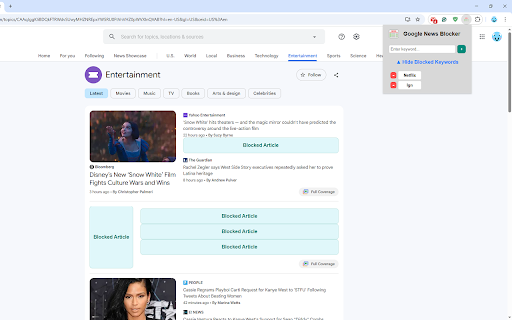
Google News Blocker removes all articles on news.google.com that contain a keyword that you have blocked. This extension serves as an easy way to block any Google News articles on topics you don't want to see.
Once installed, clicking on the extension icon will bring up a popup with a textbox for entering keywords to block and a toggle that shows a list of your currently blocked keywords. To add a keyword, type the word in the textbox and then press enter or the + button. Any articles on Google News that contain the keyword will be removed. You can remove blocked keywords by clicking the - button next to it in the list.
Google News Blocker web extension integrated with the OffiDocs Chromium online


