

Select Copy Save in Chrome with OffiDocs
Ad
DESCRIPTION
Effortlessly copy and save text snippets directly in your browser for quick access
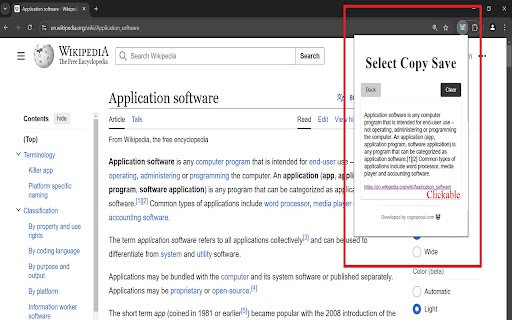
This extension enhances your browsing experience by adding a small, unobtrusive copy button to selected text. Clicking the copy button copies the text to your clipboard and simultaneously stores it locally within your browser, along with the link of the page from where the text was copied. This local storage provides a convenient history of your copied items, allowing you to easily retrieve them, improving your efficiency and preventing data loss.
You can easily clear the saved items using the clear button within the extension.
To use the extension:
1. Select the text you want to copy
2. Click the copy button
3. Open the extension to view your saved items and their corresponding page links
All copied items and their associated page links are visible within the extension's popup.
Disclaimer: This extension might not work on sites that restrict extensions from functioning
Select Copy Save web extension integrated with the OffiDocs Chromium online


