

Quick2Site Standard in Chrome with OffiDocs

Ad
DESCRIPTION
Unlock instant access to email domains! Just hold Crtl + Shft and click any email address to open its domain homepage in a new tab
This extension enhances your browsing experience by automatically detecting and highlighting email addresses on any webpage, making them interactive and actionable.
Email Detection and Highlighting:
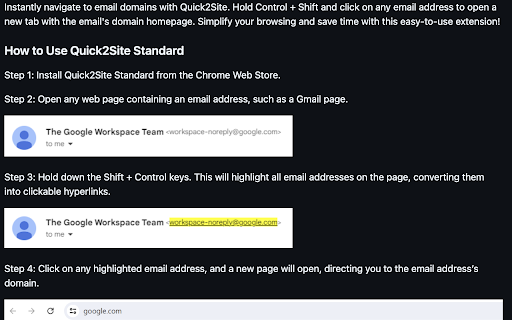
The extension scans webpages for email addresses and highlights them in yellow for easy visibility.
Detected email addresses are transformed into clickable links.
Direct Navigation to Domains:
Clicking on a highlighted email takes you directly to the associated domain (e.g., clicking This email address is being protected from spambots. You need JavaScript enabled to view it. navigates to https://gmail.com).
Toggle Highlighting:
Activate highlighting by pressing Ctrl + Shift. The extension will scan the page and highlight all email addresses.
Deactivate highlighting by releasing the keys, which removes all highlighted elements and restores the original page content.
Dynamic Updates:
The extension dynamically detects new email addresses as the content of the page changes (e.g., on scrolling or loading additional content).
Why Users Should Install It:
Convenience: Quickly spot email addresses on any webpage without manually searching.
Actionable Links: Instantly navigate to email domains for easy access or further actions.
Dynamic and Lightweight: Works seamlessly on dynamic pages, ensuring email addresses are always highlighted as content updates.
Ease of Use: Simple toggle with a keyboard shortcut to activate or deactivate highlighting.
Quick2Site Standard web extension integrated with the OffiDocs Chromium online


