

Simple Bookmark Counter in Chrome with OffiDocs

Ad
DESCRIPTION
Display bookmark count with customizable folders and badge color
A beautiful and simple Chrome extension that displays your bookmark count as a badge on the extension icon when clicked, with customizable settings for folder selection and badge appearance.
Manual Bookmark Count Display
- Bookmark count displayed as a badge on the extension icon **only when clicked**
- Left-click the extension icon to count and display bookmarks
- No automatic updates - count only refreshes when you click
- Supports counts up to 999+ with overflow indication
- Initial badge shows "?" to indicate extension is ready
Customizable Settings
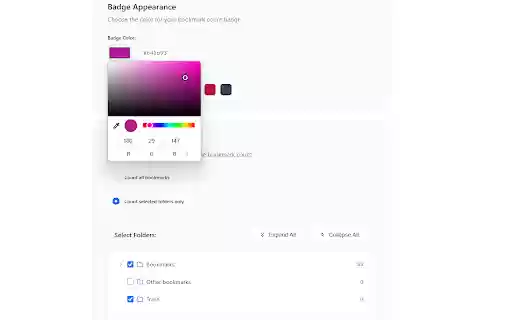
- **Badge Color**: Choose from preset colors or use a custom color picker
- **Folder Selection**:
- Count all bookmarks (default)
- Select specific folders to count
- Multi-folder selection with checkbox interface
- Visual folder tree with bookmark counts
- **Easy Reset**: One-click reset to default settings
Basic Usage
- Once installed, the extension shows a "?" badge indicating it's ready
- **Left-click the extension icon** to count and display your bookmarks
- The count will remain displayed until you click again to refresh
- **Right-click the extension icon** to access settings
Customizing Badge Color
1. Open the extension settings
2. In the "Badge Appearance" section, choose a color:
- Click on preset color buttons for quick selection
- Use the color picker for custom colors
- See live preview of your selection
3. Click "Save Settings" to apply changes
Selecting Specific Folders
1. Open the extension settings
2. In the "Bookmark Folders" section:
- Select "Count selected folders only"
- Use the folder tree to select specific folders
- Check/uncheck folders to include/exclude them
- Use "Expand All" / "Collapse All" for easier navigation
3. Click "Save Settings" to apply changes
Resetting Settings
- Click "Reset to Defaults" to restore all settings to their original values
- This will reset badge color and folder selection
Simple Bookmark Counter web extension integrated with the OffiDocs Chromium online


