

Fireworks Timer in Chrome with OffiDocs

Ad
DESCRIPTION
Measure firework durations, including prefire/lift times!
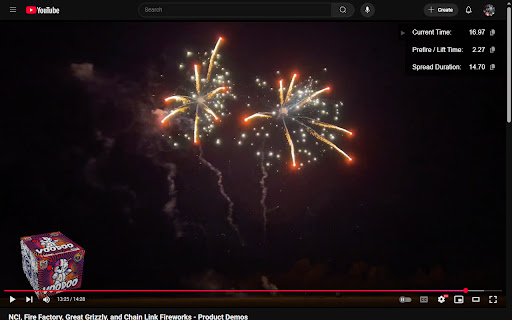
See the current video time relative to a user-defined starting point — perfect for measuring firework durations for Finale 3D!
You can also measure the prefire / lift time of the firework and see a separate duration that excludes the prefire time — exactly what we need for using the "Spread out evenly" function in Finale 3D!
This extension works on YouTube videos and other video files played directly in the browser (mp4, webm, ogg, and mkv supported)! Use the < and > keys to navigate between frames in raw videos or on YouTube.
• Seek to the time you want to mark as the beginning, press "B", then the overlay will show you the current video time relative to that point.
• After marking the beginning, seek to the first break of the firework and press "P" to mark the prefire time. Now the overlay will show you the duration of the firework, the prefire time, and the "spread duration" (which excludes the prefire time).
• Copy any of these values to your clipboard with a single click! Copying the prefire time includes a "PFT" suffix, ready for pasting into Finale 3D.
Fireworks Timer web extension integrated with the OffiDocs Chromium online


