

TaskMaster Organize Your Tasks Effortlessly in Chrome with OffiDocs

Ad
DESCRIPTION
A powerful and intuitive ToDo extension to help you stay organized, manage tasks, and boost productivity.
Introducing TaskMaster - a sleek and user-friendly Chrome extension that helps you manage your tasks with ease. Whether you're a student, a professional, or simply someone looking to stay organized, Smart ToDo offers an effortless way to keep track of your daily activities and deadlines.
Key Features:
- Simple task management: Add, edit, and delete tasks quickly with an intuitive interface.
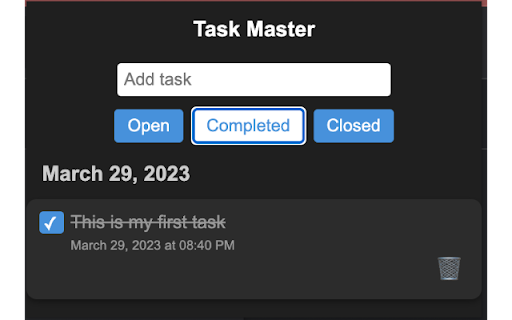
- Organize tasks into tabs: Categorize your tasks as Open, Completed, or Closed for easy navigation and management.
- Task status tracking: Update the status of your tasks by checking or unchecking the checkbox.
- Automatic timestamp: Keep track of when a task was added, completed, or closed with automatically generated timestamps.
- Local storage: Your tasks are stored locally in your browser, ensuring that your data remains private and secure.
- No signup required: Start using the extension right away without needing to create an account or sign in.
How to use TaskMaster:
- Install the extension and click on the Smart ToDo icon in your browser.
- Add tasks using the input field and submit by pressing Enter or clicking the Add button.
- Switch between the Open, Completed, and Closed tabs to view and manage tasks based on their status.
- Mark tasks as completed by checking the checkbox, or revert them to open by unchecking it.
- Move tasks to the Closed tab by clicking the trash icon or the cross icon.
- Edit tasks directly by clicking on the task text and making changes.
- Remove tasks from the Closed tab by clicking the cross icon.
- Start using Smart ToDo today and experience a more organized and productive life!
TaskMaster Organize Your Tasks Effortlessly web extension integrated with the OffiDocs Chromium online


