

Text Memo in Chrome with OffiDocs

Ad
DESCRIPTION
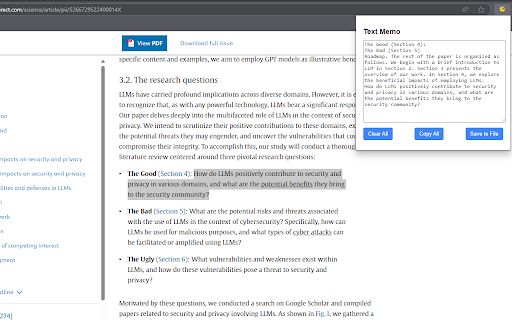
Store selected text in a memo
Text Memo: Your Digital Text Collector
Ever come across important information while browsing that you want to save for later? Text Memo makes collecting text snippets effortless.
FEATURES:
- Save any selected text with a simple right-click
- Automatically organizes entries on separate lines
- Access your collected text anytime via the extension popup
- Edit your memo directly in the extension
- One-click copy of all saved content
- Export your notes as a text file
- Clean, lightweight interface
- Works offline
- No account required
HOW IT WORKS:
1. Select any text on a webpage
2. Right-click and choose "Add to Memo"
3. Click the extension icon to view, edit, or export your saved text
Perfect for researchers, students, writers, shoppers, or anyone who needs to collect information while browsing.
Text Memo respects your privacy - all data is stored locally on your device and never transmitted online.
Text Memo web extension integrated with the OffiDocs Chromium online


