

Advanced Reader View in Chrome with OffiDocs

Ad
DESCRIPTION
Enjoy clean and distraction-free reading on any webpage.
Advanced Reader View helps you focus on what matters by turning cluttered web pages into clean, easy-to-read articles.
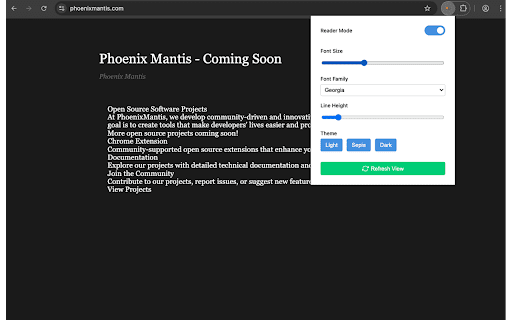
This lightweight Chrome extension removes ads, sidebars, and other distractions to deliver a smoother reading experience. You can also customize font size, font style, line spacing, and switch between light, sepia, or dark themes.
Features:
One-click activation for Reader Mode
Automatically detects and extracts main article content
Clean and distraction-free layout
Adjustable font size, line height, and font family
Multiple themes: Light, Sepia, Dark
Real-time updates without reloading the page
How to Use:
Click the extension icon in the Chrome toolbar.
Reader Mode will be applied to the current page.
Use the popup to adjust settings like font size or theme.
Note:
Reader Mode is designed for reading static content like articles and blog posts. For interactive websites or when normal page features are needed (e.g., navigation, forms), you may need to turn off Reader Mode and refresh the page to return to the original layout.
Your reading preferences are saved locally and applied automatically the next time you use the extension.
No sign-up, no tracking, no data collection — just better reading.
Advanced Reader View web extension integrated with the OffiDocs Chromium online


