

Show More Money in Chrome with OffiDocs

Ad
DESCRIPTION
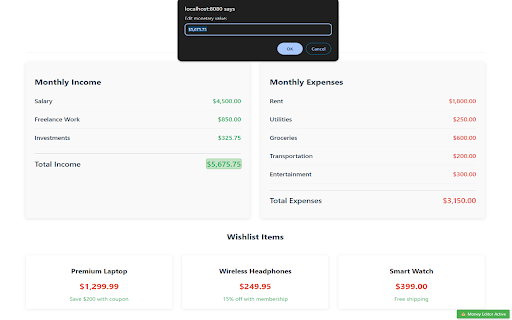
Easily change monetary values on webpages for fun
Show More Money is a simple, user-friendly Chrome extension that lets you temporarily modify monetary values on any webpage.
WHAT IT DOES:
• Allows you to click and edit any price, cost, or monetary value displayed on a webpage
• Changes are visual only and temporary - perfect for "what-if" scenarios
• Works on virtually any website where prices or monetary values are displayed
KEY FEATURES:
• Easy-to-use interface with visual highlighting of editable values
• One-click activation from your browser toolbar
• Clear visual indicators when the editor is active
• Simple hover effects show which values can be modified
• Works with multiple currency symbols ($, €, £, ¥)
HOW TO USE:
1. Click the extension icon in your toolbar
2. Click "Activate Money Editor" in the popup
3. Hover over any monetary value - it will highlight in green
4. Click on a highlighted value to edit it
5. When finished, click the green indicator in the bottom-right corner to deactivate
PERFECT FOR:
• Visualizing budget scenarios without using spreadsheets
• Seeing how price changes might affect your purchasing decisions
• Helping explain financial concepts to others
• Making screenshots with adjusted values for presentations
PRIVACY & SECURITY:
• No data collection or tracking
• All changes are temporary and visual only
• No modification of actual website data
• Works entirely within your browser
This extension is designed to be a helpful visualization tool and does not affect actual prices or enable any transactions at modified values.
Show More Money web extension integrated with the OffiDocs Chromium online


