

Picture in picture Video Player in Chrome with OffiDocs

Ad
DESCRIPTION
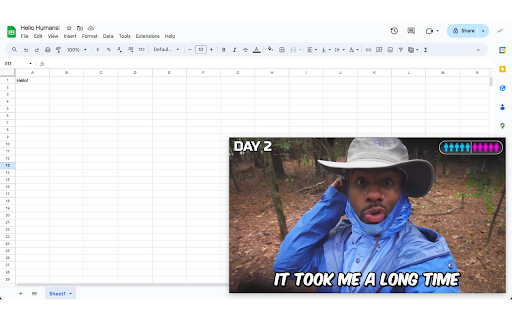
Watch your favourite shows in a pop-up while you multitask
Picture-in-picture Video Player - Full Control Over Your Video Playback.
Watch your favourite shows as a pop-up, while you multitask.
Control video playback speed, pause/play, skip, mute/unmute, and more on any website.
Picture-in-picture Video Player is a powerful and intuitive tool designed to give you full control over HTML5 video playback on any website and on Picture-in-Picture (PiP) Mode too. Whether you're watching videos for entertainment, education, or tutorials, this extension allows you to adjust playback speed, and control video behavior.
Key Features:
Picture-in-Picture (PiP) Mode: Watch videos in a small floating window while browsing other parts of the website. Draggable and resizable.
Adjust Video Speed: Change the playback speed by using a simple slider.
Pause/Play Button: Pause or resume the video directly from the extension without navigating back to the video player.
Mute/Unmute: Instantly mute or unmute the video, without affecting other audio on the page.
Compatibility: The extension works seamlessly with most HTML5 video players, including popular platforms like YouTube, Vimeo, and educational sites.
Take full control of your video experience with Picture-in-picture Video Player and enjoy videos at your pace, whether you're speeding up to save time or slowing down to understand details better.
Picture in picture Video Player web extension integrated with the OffiDocs Chromium online


