

GitLab File Tree in Chrome with OffiDocs

Ad
DESCRIPTION
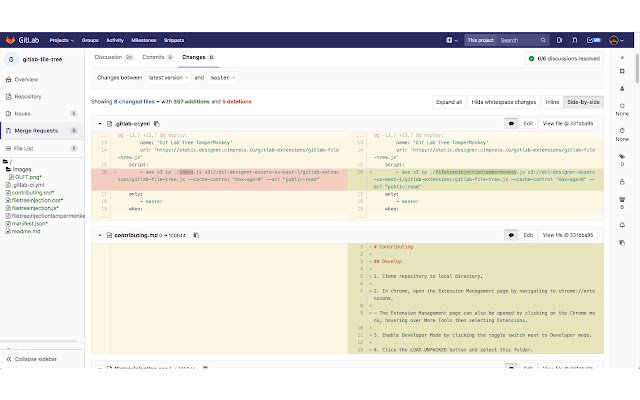
# GitLab File Tree Will show a file tree on GitLab merge request pages.
## Features Adds a file tree to the left panel when viewing a merge request.
* Click to go to file * Auto expands collapsed diffs * Shows files in a reasonable sort order * Differentiates between changed, deleted, and moved files * Almost looks native to GitLab ## Releases - Is now available as a chrome extension [Latest](https://cimpress.
githost.
io/gitlab-extensions/gitlab-file-tree/tags) ## Develop 1. Clone repository to local directory.
2. In chrome, open the Extension Management page by navigating to chrome://extensions.
- The Extension Management page can also be opened by clicking on the Chrome menu, hovering over More Tools then selecting Extensions.
3. Enable Developer Mode by clicking the toggle switch next to Developer mode.
4. Click the LOAD UNPACKED button and select this folder.
Additional Information:
- Offered by cimpress-tech
- Average rating : 3 stars (it was okay)
- Developer This email address is being protected from spambots. You need JavaScript enabled to view it.
GitLab File Tree web extension integrated with the OffiDocs Chromium online


