

AutoSnap in Chrome with OffiDocs

Ad
DESCRIPTION
Takes screenshots of a URL at regular intervals and saves them.
AutoSnap: Automated Webpage Screenshots Made Simple
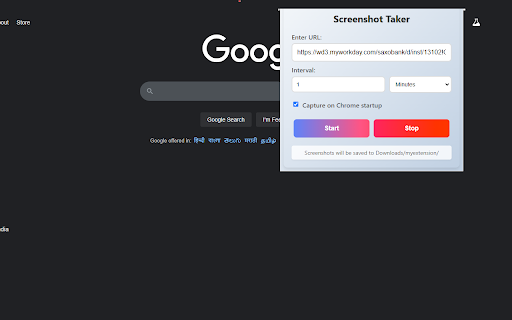
Effortlessly monitor webpages with AutoSnap! This Chrome extension lets you schedule automatic screenshots of any URL at intervals you choose—whether it’s every few minutes, hours, or days. Perfect for tracking website changes, saving snapshots for records, or keeping an eye on dynamic content without manual effort.
Key Features:
- Flexible Intervals: Set capture frequency in minutes, hours, or days to suit your needs.
- Startup Capture: Optionally take a screenshot when Chrome launches.
- Smart Naming: Screenshots are saved with filenames tailored to your interval (e.g., daily: "20250226.png", hourly: "20250226_14.png").
- Reliable Retries: For hourly or daily captures, SnapScheduler retries up to 3 times if an error occurs, ensuring you don’t miss a shot.
- Easy Setup: Just enter a URL, pick an interval, and start—no fuss, no extra tools.
How It Works:
1. Enter the webpage URL you want to capture.
2. Choose your interval (e.g., 5 minutes, 1 hour, 2 days).
3. Click "Start"—screenshots save automatically to your Downloads/my extension folder.
Ideal For:
- Web developers tracking site updates.
- Researchers archiving webpage states.
- Anyone needing timed webpage snapshots.
SnapScheduler runs quietly in the background, making it a seamless addition to your workflow. Install now and start capturing webpages on your schedule!
Feedback welcome—we’re here to improve your experience.
AutoSnap web extension integrated with the OffiDocs Chromium online


