

dotpush in Chrome with OffiDocs
Ad
DESCRIPTION
dotpush auto-syncs your LeetCode solutions to GitHub, building your coding portfolio effortlessly.
dotpush turns every LeetCode solution you write into a polished, version-controlled GitHub commit—automatically.
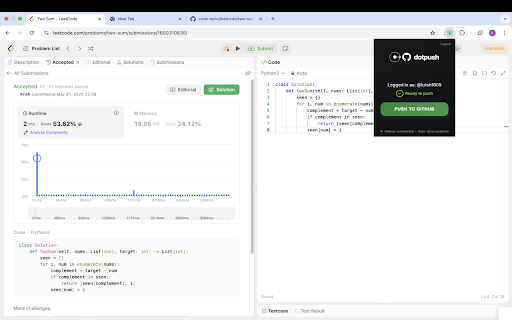
One-click “Push to GitHub” inside the extension popup
Detects whatever language you code in (Python, JS, Java, C++, …) and names the file correctly
Creates/updates leetcode/<problem-slug>.<ext> in your personal code-sync repo—no duplicates, just clean-tracked revisions
OAuth Device Flow: you grant GitHub access with an 8-digit code; no PATs or secrets to copy-paste
Needs only minimal permissions and the lightweight public_repo scope
Whether you’re building a public portfolio, keeping private backups, or just want to track your progress over time, dotpush lets you focus on solving problems while it handles the commits.
dotpush web extension integrated with the OffiDocs Chromium online


